The next generation
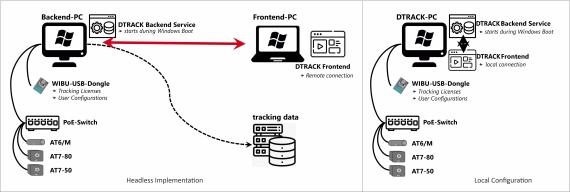
With the growing requirements of cost and space savings, as well as of flexible and easy to integrate systems without “black-boxes within the company network”, we decided to develop a Windows™ 10/11 based DTRACK Software version, eliminating the need for a dedicated ART Controller.
Our tracking software DTRACK4
- optimized for simplicity, speed and significant cost savings
- now runs directly on almost any Windows PC, eliminating the need for proprietary hardware
- enriched with the highly anticipated 3D Monitor View, improving workflow and paving the way for DTRACK4 as your everyday tracking tool
- enabled with license dongle, which automatically stores all your settings
- fully optimized for AT6/M, AT7-50 and AT7-80 tracking cameras, ensuring seamless integration and outstanding performance
- includes all features of the latest DTRACK3 release
Unity and Unreal
Free downloads: The DTRACK Unity plugin is available in the Unity Asset Store as well as on the OpenUPM portal, while the DTRACK Unreal plugin can be downloaded from our ART GitHub page.
Use it for:
- HMD arenas, Powerwalls, CAVEs
- High-immersive VR/AR/XR applications
- Simulators
- Robotics
- Drone Tracking
- Design & Production, e.g. Seating buck installations
- ADAS
- Ergonomics & Motion Capture
- Virtual Production
- Accurate Measurement Tasks
- and much more! Get in touch to elaborate YOUR solution!
How to Upgrade from existing DTRACK1/2/3 versions to DTRACK4?
If you are already working with a DTRACK1,2, or 3 Version and want to upgrade to DTRACK4:
Purchase the DTRACK4 License, install it on a Windows PC (requirements see above) and start.
Please note:
- existing ARTTRACK5(/C) systems need at least one ARTTRACK6/M, AT7-50 or AT7-80 camera to run DTRACK4.
- DTRACK4 is not suitable for ARTTRACK1/2/3, TRACKPACK or SMARTTRACK systems
- Used ART Controller can be returned to ART. Contact us to learn more: